Nord Wave 2 Review 2026: Is This Performance Synth Still Worth It?
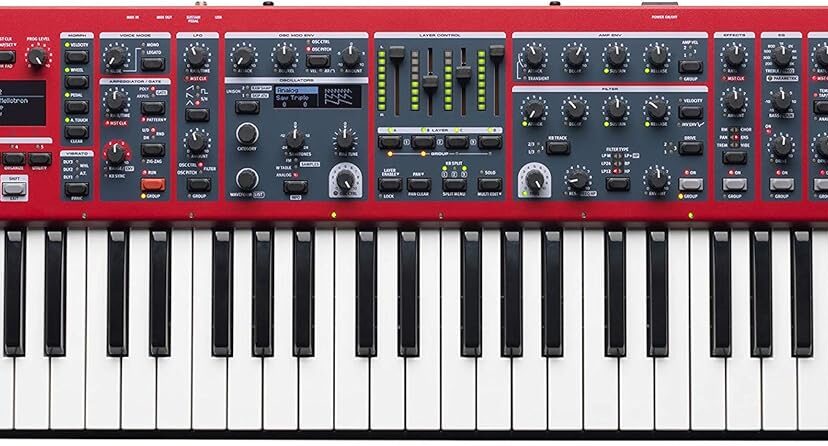
The Nord Wave 2 isn’t a digital piano in the traditional sense.
It doesn’t have 88 weighted hammer-action keys, and it isn’t primarily designed for someone looking for an acoustic-piano substitute.
Instead, the Wave 2 is a 61-key performance synthesizer built for musicians who want to create, layer and manipulate sounds quickly—particularly in live performance.
Its defining feature is a four-part architecture that lets you combine different types of synthesis and samples in a single performance.
Virtual analog, wavetable, FM and sample-based sounds can all become part of the same layered patch.
Add aftertouch, extensive morphing, hands-on controls, an advanced arpeggiator and separate effects capabilities, and the result is a very different instrument from a conventional home digital piano.
But the Wave 2 is also a premium instrument.
So who actually needs it?
And is the Nord Wave 2 still worth considering in 2026?
Nord Wave 2 at a Glance
| Feature | Nord Wave 2 |
|---|---|
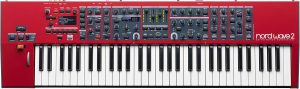
| Keyboard | 61 keys with aftertouch |
| Sound architecture | 4 independent synth layers |
| Synthesis | Virtual Analog, Wavetable, FM and Samples |
| Polyphony | 48 voices |
| Sample memory | 1 GB |
| Custom samples | Yes |
| Splits | Up to 4 zones |
| Arpeggiator | Advanced, including Polyphonic Trig and Gate |
| Morph sources | Velocity, Aftertouch, Mod Wheel and Control Pedal |
| Effects | Layer-oriented effects + delay + reverb |
| Displays | OLED Program and Oscillator displays |
| MIDI | MIDI In/Out + USB-MIDI |
| Best for | Live performers, synthesists, sound designers and advanced keyboardists |
Quick Verdict
The Nord Wave 2 remains an unusually powerful performance synthesizer for musicians who value immediate hands-on control.
Its biggest strengths are:
- Four independent layers
- Multiple synthesis methods
- Sample playback
- User-loadable samples
- 61-key aftertouch keyboard
- Powerful morphing
- Fast hands-on sound manipulation
- Flexible splits and layers
- Advanced arpeggiator
- Strong live-performance workflow
- Nord Sample Library compatibility
Its biggest limitation is equally important:
It isn’t the right Nord for everyone.
If piano playing is your main priority, a Nord Piano or Grand is more appropriate.
If you need one keyboard covering piano, organ and synthesizer duties on stage, the Nord Stage 4 is likely the stronger all-purpose instrument.
But if your priority is synthesis, samples, layering and real-time performance control, the Wave 2 occupies a distinctive position.
[Check Nord Wave 2 Price on Amazon →]
Affiliate Disclosure
Some links on Pianos-Galore are affiliate links. If you purchase through these links, we may receive a small commission at no additional cost to you.
What Exactly Is the Nord Wave 2?
The easiest way to understand the Wave 2 is to think of it as four synthesizers working together inside one keyboard.
Each of its four parts can have its own sound.
You can then:
- Layer those sounds
- Split them across the keyboard
- Adjust their relative volumes
- Pan them
- Edit multiple layers
- Morph parameters while performing
This architecture is central to the Wave 2.
Suppose you’re creating a cinematic performance patch.
You might combine:
Layer 1: Warm analog pad
Layer 2: Sampled strings
Layer 3: FM bell texture
Layer 4: Wavetable atmosphere
Those four components can form one playable sound.
That’s fundamentally different from choosing a single synthesizer preset and playing it.
Four Sound Engines: Where the Wave 2 Gets Its Versatility
The Wave 2 supports four main oscillator approaches:
1. Virtual Analog
Virtual analog synthesis recreates many of the principles associated with traditional analog synthesizers digitally.
The Wave 2 provides numerous analog-style waveform options, including basic, shaped, multi, synchronized and noise-based sources.
This makes it suitable for:
- Leads
- Basses
- Pads
- Brass-like synth sounds
- Electronic textures
- Classic synthesizer tones
2. Wavetable
Wavetable synthesis offers more complex digital waveforms and tonal possibilities.
Rather than being restricted to traditional saw, square and sine waves, you can explore a much wider variety of harmonic structures.
This is particularly useful for modern electronic textures and evolving sounds.
3. FM Synthesis
FM—or frequency modulation—can produce sounds with characteristics quite different from conventional subtractive analog synthesis.
It can be particularly effective for:
- Metallic tones
- Bells
- Digital keyboards
- Percussive sounds
- Bright textures
- Complex harmonic timbres
The Wave 2 provides multiple FM configurations rather than treating FM as a token additional feature.
4. Samples
This is one of the Wave 2’s most important capabilities.
The instrument can use sampled sounds from Nord’s Sample Library, including categories such as:
- Strings
- Brass
- Guitars
- Choirs
- Chromatic percussion
- Mellotron sounds
- Chamberlin sounds
You can also create and transfer your own sample instruments using Nord’s Sample Editor.
This means the Wave 2 isn’t restricted to sounds that can be synthesized conventionally.
Why Four Layers Matter
Plenty of synthesizers can create excellent individual sounds.
The Wave 2’s particular strength is how easily it lets you combine sounds.
Each layer has dedicated volume/pan faders.
That matters during live performance.
Imagine you’re playing a layered pad containing strings and an analog synth.
During the verse, you want the strings relatively quiet.
As the chorus arrives, you push the string layer upward.
Later, you reduce it again.
You don’t want to stop playing, open a menu and search for a mixing parameter.
The physical faders make this immediate.
That’s a recurring theme with the Wave 2:
Its capabilities are designed to remain accessible while you’re actually performing.
Group Mode: Controlling Multiple Layers Together
Four layers can create another problem.
What happens when you want to edit several of them simultaneously?
Nord’s Group function allows two, three or four layers to share settings for parameters such as:
- Filter
- Envelope
- Arpeggiator
- LFO
- Effects
This can make a complex layered sound behave more like one coherent instrument.
Instead of individually changing several layers, you can manipulate them together.
For sound design, that’s convenient.
For live performance, it can be even more valuable.
Splits: Up to Four Keyboard Zones
The Wave 2 supports three split points, creating as many as four keyboard zones.
Crossfades can also be used around split points.
That means a performer could construct a setup such as:
Lower zone: Synth bass
Middle-lower: Pad
Middle-upper: Sampled strings
Upper zone: Lead synth
Whether you need something that elaborate is another question.
But for performers who build complicated multi-instrument setups, this flexibility can reduce the need for multiple keyboards.
61-Key Keyboard With Aftertouch
The Wave 2 has 61 keys with aftertouch.
This is not a weighted hammer-action piano keyboard.
That’s deliberate.
Synthesizer players often want a different kind of action from pianists.
A lighter action can make it easier to perform:
- Rapid synth leads
- Organ-like passages
- Repeated notes
- Fast electronic parts
- Sound effects
Why Aftertouch Matters
Aftertouch detects additional pressure after you’ve already pressed a key.
That pressure can then control a sound parameter.
For example, you could hold a synth note and press further into the key to introduce:
- Vibrato
- Filter movement
- Modulation
- Another expressive effect
This lets you change the sound without removing your hand from the keyboard.
For expressive synthesizer playing, that’s a valuable performance tool.
Morphing: One of the Wave 2’s Best Performance Features
Morphing is one of the strongest arguments for the Wave 2.
You can assign parameters to four different morph sources:
- Velocity
- Aftertouch
- Modulation Wheel
- Control Pedal
One morph source can control multiple parameters.
Imagine pushing the modulation wheel forward and simultaneously:
- Opening the filter
- Increasing an effect
- Changing oscillator characteristics
- Raising the level of another layer
A complex sound can transform while you’re playing.
That’s considerably more expressive than simply switching from preset A to preset B.
Impulse Morph
Impulse Morph extends this idea by allowing rapid parameter changes.
This can be useful for instant sound variations during performance.
Instead of storing numerous nearly identical programs, you can build variations into a single performance setup and access them when needed.
For stage musicians, that can make patch organization considerably more efficient.
Advanced Arpeggiator
The Wave 2 isn’t limited to a basic up/down arpeggiator.
Its arpeggiator provides several performance-oriented capabilities.
Polyphonic Mode
Rather than simply cycling through individual held notes, Polyphonic Trig mode can retrigger chords rhythmically.
That makes it useful for:
- Rhythmic pads
- Pulsing chord patterns
- Electronic accompaniment
- Cinematic textures
Gate Mode
Gate mode rhythmically chops the sound.
This can transform a sustained pad into a rhythmic texture without requiring an external sequencer.
Pattern Mode
Patterns can be used to create more elaborate rhythmic behavior.
And because the arpeggiator can interact with the instrument’s Master Clock, multiple rhythmic elements can remain synchronized.
Master Clock
Timing becomes complicated when a sound includes:
- Arpeggiators
- LFOs
- Delays
- Multiple layers
The Wave 2’s Master Clock helps synchronize these elements.
The clock can also synchronize to external MIDI clock.
For live performers using backing tracks, drum machines or other synchronized equipment, this can be particularly useful.
Filters and Sound Shaping
The Wave 2 provides six filter types.
These include various low-pass, high-pass, band-pass and combined configurations, along with a modeled transistor-ladder-style filter.
Filter Drive can add additional character.
Each layer also has its own modulation possibilities through LFO and envelope controls.
This combination gives the Wave 2 plenty of scope for traditional synthesizer sound design without requiring you to spend your performance staring at a computer.
Effects
Effects are another important part of the Wave 2’s architecture.
Available effects include categories such as:
- Tremolo
- Pan
- Ring modulation
- Chorus
- Ensemble
- Vibe
- Drive
- Delay
- Reverb
The delay provides features including Ping Pong and Analog modes, while the reverb offers several space sizes plus tonal variations.
Again, the key attraction isn’t simply that effects exist.
Many synthesizers have effects.
It’s the way the Wave 2 integrates effects into its hands-on, layer-based performance workflow that makes them particularly useful.
Nord Sample Library
One major advantage of buying into the Nord ecosystem is access to Nord’s sound libraries.
The Wave 2 can load compatible samples using Nord Sound Manager.
You’re therefore not permanently restricted to the factory sample selection.
Nord continues to provide downloadable sounds for the Wave 2, extending the useful life of the instrument beyond its original factory content.
You can replace samples as your needs change.
For performers, that can be particularly useful when preparing sounds for specific songs or shows.
Can You Load Your Own Samples?
Yes.
Nord Sample Editor allows you to create custom sample instruments on Mac or Windows and transfer them to the Wave 2.
This opens numerous possibilities.
For example, you could potentially build an instrument around:
- Your own recordings
- Unusual acoustic sounds
- Sound effects
- Custom percussion
- Specialized performance samples
The Wave 2 can then combine those samples with its synthesis capabilities.
This hybrid approach is one reason the instrument is difficult to categorize as merely an analog-style synth or sample keyboard.
Is the Nord Wave 2 Good for Live Performance?
This is arguably where it makes the strongest case for itself.
Many synthesizers are powerful in the studio.
But studio power doesn’t automatically translate into a good stage instrument.
During a performance, you need to make changes quickly.
The Wave 2 gives you physical access to many important controls.
Its strengths for live use include:
- Four layers
- Layer faders
- Keyboard splits
- Crossfades
- Aftertouch
- Morphing
- Impulse Morph
- Arpeggiator
- Hands-on effects
- OLED displays
- Sample support
The less time you spend navigating menus during a performance, the better.
Nord clearly designed the Wave 2 around that philosophy.
Is the Nord Wave 2 Good for the Studio?
Yes, but with an important qualification.
The Wave 2 can be an excellent studio synthesizer because of its multiple synthesis methods, sample capabilities and extensive sound-shaping options.
It also supports MIDI communication, including USB-MIDI.
But it doesn’t try to replace a computer-based production environment.
For example, it doesn’t have a full workstation-style multitrack sequencer.
If your workflow revolves around a DAW, that’s probably not a problem.
You can use the Wave 2 as a sound source and performance instrument while letting your computer handle sequencing and recording.
Is the Nord Wave 2 Good for Piano?
This is where Pianos-Galore readers need to be particularly careful.
Don’t buy the Wave 2 primarily because you want a digital piano.
Its 61-key keyboard is designed for synthesizer performance rather than acoustic-piano simulation.
If your priorities are:
- Classical practice
- Acoustic-piano technique
- 88 keys
- Hammer action
- Realistic grand-piano feel
look at a proper digital or stage piano instead.
Nord itself offers other product families better suited to those requirements.
The Wave 2’s strengths lie elsewhere.
Nord Wave 2 vs. Nord Stage 4
This is probably the most important comparison for many potential buyers.
The Nord Stage 4 is designed as a broad professional performance keyboard.
It combines major piano, organ and synthesizer capabilities.
Interestingly, its synth section is based on the Nord Wave 2 synth engine.
So why buy a Wave 2?
Because the two instruments have different priorities.
Choose the Nord Wave 2 If:
- Synthesis is your main priority.
- You want four synth layers.
- You work extensively with samples.
- You want a compact 61-key synth.
- You want deep hands-on synth control.
- You don’t need a dedicated Nord Piano section.
- You don’t need a dedicated organ section.
Choose the Nord Stage 4 If:
- You need one keyboard for an entire professional gig.
- Acoustic and electric piano sounds are major priorities.
- Organ is important.
- Synthesizer capability is one part of a larger performance setup.
- You want weighted 88 keys or one of the Stage’s other keyboard configurations.
The Stage 4 is the more comprehensive stage instrument.
The Wave 2 is the more specialized synthesizer.
Musicians who need dedicated piano and organ sections in addition to synthesis should also consider the Nord Stage 4 as an all-in-one performance keyboard, rather than choosing the more synthesis-focused Wave 2.
Nord Wave 2 vs. Nord Lead
Nord’s Lead family takes a more traditional synthesizer-oriented approach.
The Wave 2’s major differentiator is the integration of sample-based sound creation alongside analog-style, wavetable and FM synthesis.
If samples and complex hybrid layers are central to your music, the Wave 2 becomes particularly attractive.
Is 48-Voice Polyphony Enough?
The Wave 2 provides 48-voice polyphony.
On a simple single-layer patch, that may seem generous.
But remember that this is a four-layer synthesizer.
Complex layered sounds can consume available voices more quickly.
Whether this becomes a practical limitation depends heavily on:
- How many layers you use
- The sounds you’re playing
- Release times
- Sustain
- Performance style
For many live applications, 48 voices will be sufficient.
But users creating extremely dense layered arrangements should understand that polyphony isn’t unlimited.
What the Nord Wave 2 Doesn’t Have
Knowing what an instrument lacks can be just as useful as knowing its features.
No 88-Key Hammer Action
This isn’t intended to replace a piano.
No Built-In Speakers
It’s designed for stage/studio amplification rather than casual standalone home playing.
No Full Workstation Sequencer
You’ll need external hardware or software if sophisticated sequencing is part of your workflow.
No Dedicated Nord Piano Engine
Samples can provide acoustic instrument sounds, but this isn’t equivalent to owning a Nord Piano or Stage with its dedicated Piano section.
No Dedicated Organ Section
Again, the Nord Stage or Electro is better suited if organ is a major part of your playing.
Who Should Buy the Nord Wave 2?
The Wave 2 makes the most sense for:
- Professional keyboardists
- Live performers
- Synthesizer enthusiasts
- Sound designers
- Electronic musicians
- Film/game composers
- Musicians who use complex layered patches
- Players who need samples and synthesis in one keyboard
Who Should NOT Buy It?
Look elsewhere if:
- You’re primarily learning piano.
- You need 88 weighted keys.
- You want built-in speakers.
- You mainly play acoustic piano.
- You need a complete arranger keyboard.
- You want an all-in-one workstation with extensive sequencing.
- You only need simple synthesizer sounds occasionally.
A powerful instrument isn’t automatically the right instrument.
Pros and Cons
Pros
Four independent synth layers
Excellent for complex performance patches.
Four synthesis approaches
Virtual Analog, Wavetable, FM and Samples provide considerable sonic variety.
Excellent hands-on workflow
Designed for quick changes rather than excessive menu navigation.
Aftertouch
Adds useful real-time expression.
Powerful morphing
Multiple parameters can evolve dynamically during performance.
Strong sample capabilities
Compatible with Nord Sample Library and user-created samples.
Advanced arpeggiator
Particularly useful for rhythmic performance textures.
Flexible splits
Up to four zones allow sophisticated keyboard setups.
Built for live musicians
Many important functions remain immediately accessible.
Cons
Premium price
This is a professional instrument rather than an inexpensive entry-level synthesizer.
Only 61 keys
Perfectly reasonable for a performance synth, but limiting for some keyboardists.
Not a piano replacement
No 88-key hammer action or dedicated Nord Piano engine.
48-note polyphony requires some awareness
Dense four-layer patches can consume voices quickly.
No full sequencer
Production-focused musicians may still depend heavily on a DAW.
Frequently Asked Questions
Is the Nord Wave 2 still worth buying in 2026?
For musicians specifically seeking a performance-oriented synthesizer with four layers, multiple synthesis methods, sample support and extensive real-time controls, it remains a compelling instrument.
How many keys does the Nord Wave 2 have?
It has 61 keys with aftertouch.
Does the Nord Wave 2 have weighted keys?
It does not use the type of weighted hammer action associated with an 88-key digital piano. Its keyboard is intended for synthesizer-style performance.
Does the Nord Wave 2 have aftertouch?
Yes. Aftertouch can also be used as a morph source for expressive parameter control.
Can the Nord Wave 2 load samples?
Yes. It works with compatible Nord Sample Library content and supports user-created samples through Nord Sample Editor.
What types of synthesis does it offer?
Virtual Analog, Wavetable, FM and sample-based synthesis.
How many layers can you use?
The Wave 2 provides four independent synth layers.
What is the polyphony?
It provides 48-voice polyphony.
Does it have an arpeggiator?
Yes. Its advanced arpeggiator includes polyphonic, gate and pattern-oriented functionality.
Can I use the Nord Wave 2 with a DAW?
Yes. MIDI connectivity, including USB-MIDI, allows it to integrate into computer-based music setups.
Does it have built-in speakers?
No. You’ll need headphones, amplification or appropriate external monitoring.
Is it good for beginners?
A beginner specifically interested in synthesis could certainly learn on it, but its capabilities and price make it much more naturally suited to experienced musicians and serious synthesizer users.
Is the Nord Wave 2 better than the Nord Stage 4?
Neither is universally better. The Wave 2 is more specialized around synthesis and layering, while the Stage 4 combines piano, organ and synthesizer capabilities for broader professional stage use.
Nord Wave 2 Review: Final Verdict
The Nord Wave 2 remains unusual because it combines deep synthesis with an interface designed for actual performance.
There are plenty of powerful synthesizers.
There are plenty of keyboards that can play samples.
And there are plenty of instruments capable of layering several sounds.
The Wave 2’s attraction comes from bringing those capabilities together in a way that encourages you to manipulate them while you’re playing.
Four independent layers can combine:
- Virtual Analog synthesis
- Wavetable synthesis
- FM
- Samples
Those layers can then interact with splits, morphing, aftertouch, arpeggiation, filters and effects.
For a musician creating evolving pads, complex textures, synth leads, hybrid sampled sounds or sophisticated live-performance patches, that’s a formidable toolkit.
But the Wave 2 is specialized.
Pianists should generally look elsewhere.
Organ-focused players have better Nord options.
And performers needing piano, organ and synthesis from one flagship keyboard should strongly consider the Nord Stage 4.
The Wave 2 makes the most sense when synthesis itself is the reason you’re buying the instrument.
For that musician, the Nord Wave 2 remains a distinctive and highly capable performance synthesizer in 2026.
[Check Nord Wave 2 Price on Amazon →]
Related Articles
- Best Nord Keyboards in 2026: Which Nord Is Right for You?
- Best 88-Key MIDI Keyboards & Digital Pianos in 2026: 6 Top Picks
- Piano Keyboards: The Complete 2026 Buying Guide
- Digital Piano vs Keyboard: Which Should You Buy in 2026?
Ready to start learning piano? Simply Piano offers lessons to help you play your favorite songs.

- Begin with beginner-friendly lessons or dive into advanced courses.
- Learn at your own pace with real-time feedback.
- Play classical, pop, and Disney tunes with personalized exercises.
- Start your piano journey today with SIMPLY PIANO!