Best Digital Pianos for Home Recording in 2026
Recording music at home has never been easier. With a laptop, digital audio workstation (DAW), headphones or studio monitors, and the right digital piano, you can create surprisingly sophisticated recordings without a commercial studio.
But not every digital piano is equally suitable for recording.
If you’re buying primarily for home music production, features that may seem unimportant to a casual pianist—such as USB audio, USB MIDI, line outputs, Bluetooth MIDI, and DAW compatibility—can make a major difference to your workflow.
The best choice also depends on what you want to record.
Do you want to capture the actual sound of your digital piano? Use the keyboard to control virtual instruments? Record classical piano performances? Produce pop songs with multiple software instruments?
Those are different jobs.
In this guide, we’ll look at several digital pianos that work particularly well in a home recording environment and explain the features that matter most.
Disclosure: Some links on Pianos-Galore are affiliate links. If you purchase through these links, we may receive a small commission at no additional cost to you.
MIDI vs Audio: Understand This Before Buying
This is probably the most important concept to understand when choosing a digital piano for recording.
MIDI Recording
MIDI does not record the actual sound coming from your piano.
Instead, it records performance information such as:
- Which notes you played
- When you played them
- How long you held them
- How hard you struck the keys
- Pedal information
Your computer can then use this information to play a software instrument or virtual piano.
This is extremely powerful.
Suppose you record a performance using a Yamaha piano sound but later decide you want a completely different concert grand.
With MIDI, you can change the virtual instrument after recording without playing the piece again.
You can also correct notes, adjust timing, change velocity, transpose passages, and edit individual notes.
Audio Recording
Audio captures the actual sound.
If you love your digital piano’s onboard grand-piano tone and want that exact sound in your recording, you need an audio signal.
Depending on the instrument, that may be sent through:
- USB audio
- Dedicated line outputs
- Headphone output
A digital piano with a built-in USB audio interface can make this particularly convenient because audio can travel directly from the piano to your computer through USB.
Do You Need an Audio Interface?
Not necessarily.
This depends heavily on your piano.
If your digital piano can send both audio and MIDI over USB, you may be able to connect it directly to your computer.
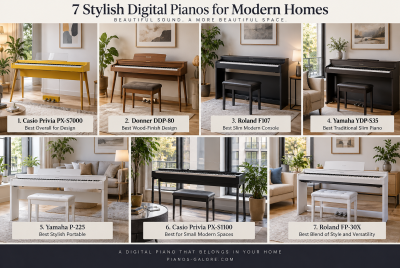
That’s one reason the Yamaha P-225 and Roland FP-30X are particularly interesting for home recording.
Yamaha specifies a 44.1 kHz, 24-bit stereo USB audio interface in the P-225.
Roland likewise gives the FP-30X USB audio/MIDI connectivity specifically for interfacing with computers and recording in music-production software.
However, a separate audio interface can still be useful when you also want to record:
- Vocals
- Acoustic guitar
- Electric guitar
- Microphones
- Other keyboards
- Multiple instruments simultaneously
So don’t automatically buy an interface before checking what your digital piano can already do.
Best Digital Pianos for Home Recording
1. Yamaha P-225 — Best Overall for Easy Audio + MIDI Recording
The Yamaha P-225 is particularly attractive for a home studio because it combines a genuine piano-oriented instrument with unusually convenient recording connectivity.
It has:
- 88 weighted GHC keys
- Yamaha CFX concert-grand-based piano sound
- 192-note polyphony
- 24 voices
- USB audio
- USB MIDI
- Dedicated AUX outputs
- Built-in MIDI recording
- Built-in speakers
- Headphone outputs
Yamaha’s USB audio implementation operates at 44.1 kHz/24-bit stereo, allowing the instrument to function as a USB audio interface.
Why This Matters for Recording
Imagine you’ve played a piano track that you want to record using the P-225’s own CFX-based piano sound.
You can send digital audio through USB rather than having to route an analog headphone signal into another device.
Alternatively, record MIDI into your DAW and use a virtual piano instead.
That gives you two fundamentally different workflows from the same instrument.
AUX Outputs
The P-225 also provides dedicated L/L+R and R AUX outputs.
That’s useful if you want to connect the piano to:
- Studio monitors
- Mixer
- Audio interface
- PA system
- External recording equipment
Built-In Recording
The P-225 also contains a two-track MIDI recorder.
For quick musical ideas, you don’t necessarily have to start your DAW.
Who Is It Best For?
- Singer-songwriters
- Pianists recording at home
- YouTube musicians
- Composers
- Students recording performances
- Musicians wanting both audio and MIDI flexibility
Best for: Home musicians wanting straightforward audio and MIDI integration without a complicated setup.
2. Roland FP-30X — Best for MIDI and DAW Flexibility
The Roland FP-30X is another excellent home-recording choice.
It combines Roland’s PHA-4 Standard weighted keyboard with its SuperNATURAL piano technology and strong connectivity.
Roland specifically supports USB audio/MIDI, allowing the FP-30X to interface directly with computers and professional music-production software.
It also supports Bluetooth MIDI for compatible devices and applications.
Why the FP-30X Works Well in a Home Studio
The FP-30X gives you several ways to work.
You can:
- Record MIDI into your DAW
- Use virtual instruments
- Record the piano via USB
- Connect external speakers through dedicated outputs
- Work with music apps through Bluetooth MIDI
- Record ideas internally
Roland specifies 256-note polyphony, 88 PHA-4 Standard keys with escapement and Ivory Feel, and 11W × 2 amplification.
MIDI Production
For producers who use software instruments, the FP-30X’s keyboard action is an important advantage.
You aren’t limited to Roland’s piano sounds.
Use the FP-30X as a controller and you can play:
- Virtual grand pianos
- Electric pianos
- Strings
- Synthesizers
- Organs
- Orchestral libraries
That makes it useful well beyond traditional piano recording.
Who Is It Best For?
- Pianists using DAWs
- Composers
- MIDI-based producers
- Classical musicians recording performances
- Players wanting a good piano and controller in one instrument
Best for: Pianists wanting an expressive 88-key instrument that also integrates well with computer-based production.
3. Roland FP-10 — Best Budget Recording Piano for MIDI Users
If your budget is lower, the Roland FP-10 deserves consideration.
Its major attraction is that you still get Roland’s PHA-4 Standard keyboard.
That means you’re not necessarily sacrificing the physical playing experience simply because you’re spending less.
For someone primarily recording MIDI, this can be an excellent strategy.
Why?
If you’re using a high-quality virtual piano inside your computer, the digital piano’s onboard speaker system and internal sound library become less important.
What matters considerably more is:
- Keyboard action
- Velocity response
- MIDI transmission
- Pedal input
- Playing comfort
Your computer supplies the sound.
This changes the buying equation dramatically.
A less expensive digital piano with a good action can become a very capable home-studio controller when paired with quality virtual instruments.
Who Is It Best For?
- Budget home studios
- MIDI recording
- Beginning producers
- Pianists using virtual instruments
- Students wanting both practice and recording capability
Best for: Budget-conscious pianists primarily recording MIDI rather than relying on onboard audio.
4. Alesis Recital Pro — Best Budget Choice for Beginning Producers
The Alesis Recital Pro is another option for someone assembling a first home-recording setup on a limited budget.
It provides:
- 88 hammer-action keys
- Adjustable touch response
- USB-MIDI
- Multiple onboard sounds
- Built-in speakers
- Headphone output
- Layer and split functions
The main attraction is straightforward: it gives a beginner a full-size hammer-action keyboard that can communicate with computer music software without requiring a large initial investment.
Best Used as a MIDI Controller
For home production, I would particularly consider the Recital Pro as an affordable MIDI input keyboard.
Connect it to your DAW and you aren’t restricted to its internal sounds.
You can trigger whichever software instruments your recording setup provides.
Who Is It Best For?
- Beginners
- First-time home producers
- Budget-conscious musicians
- Students learning DAW recording
- Songwriters creating demos
Best for: Beginning home-recording musicians who need 88 hammer-action keys at an accessible price.
Quick Comparison
| Model | Weighted 88 Keys | USB MIDI | USB Audio | Dedicated Audio Out | Best For |
|---|---|---|---|---|---|
| Yamaha P-225 | Yes | Yes | Yes | Yes | Audio + MIDI recording |
| Roland FP-30X | Yes | Yes | Yes | Yes | DAW/home studio |
| Roland FP-10 | Yes | Yes | More basic | Limited | Budget MIDI setup |
| Alesis Recital Pro | Yes | Yes | MIDI focused | Yes | Beginner production |
Which Is Best for Recording Actual Piano Sound?
If you want to record the instrument’s own internal piano sound, I would favor the Yamaha P-225 or Roland FP-30X.
Both provide more complete recording connectivity.
The P-225 is particularly straightforward because Yamaha explicitly provides its 24-bit stereo USB audio interface as well as dedicated AUX outputs.
Which Is Best for MIDI Recording?
This changes the answer.
If your main goal is to control virtual instruments, the quality of the keyboard action becomes extremely important.
The Roland FP-10 can therefore be surprisingly attractive.
You’re getting the PHA-4 Standard action without paying for all the additional capabilities of a higher model.
Your computer and software provide the sounds.
Digital Piano vs MIDI Controller for Home Recording
This is a question every home musician should ask.
Do you actually need a digital piano?
A dedicated MIDI controller may provide:
- Knobs
- Sliders
- Drum pads
- Transport controls
- DAW integration
- Pitch and modulation controls
These are valuable for electronic music production.
However, many MIDI controllers don’t provide the kind of weighted 88-key action a pianist wants.
Choose a digital piano when:
- Piano is your primary instrument
- Realistic weighted keys matter
- You also want to practice without a computer
- Built-in piano sounds matter
- You want onboard speakers
Choose a MIDI controller when:
- Music production is the primary goal
- Synths and electronic instruments dominate
- Knobs, pads and faders matter
- Piano technique is secondary
Some musicians eventually use both.
What Is a DAW?
DAW stands for Digital Audio Workstation.
This is the software where you record, edit, mix and produce music.
Popular DAWs include applications such as:
- Logic Pro
- Ableton Live
- FL Studio
- Cubase
- Studio One
- Pro Tools
- Reaper
- GarageBand
Your digital piano can communicate with the DAW through MIDI, audio, or both.
What Is a Virtual Piano?
A virtual piano is software that generates piano sound inside your computer.
Instead of recording the digital piano’s built-in sound, you record MIDI performance data and use that data to play the virtual instrument.
This offers enormous flexibility.
You could record once and then audition your performance using different virtual grand pianos without replaying it.
Virtual instruments can also provide sounds that your digital piano doesn’t contain.
Latency: An Important Home-Recording Issue
Latency is the delay between pressing a key and hearing the sound from your computer.
Too much latency makes playing uncomfortable.
Several factors affect latency:
- Computer performance
- Audio drivers
- Buffer settings
- Audio interface
- Software
- Virtual instrument
If you’re experiencing noticeable delay while playing virtual instruments, don’t immediately blame the keyboard.
The computer audio configuration may be responsible.
Should You Record MIDI or Audio First?
For many home musicians, recording MIDI first provides maximum flexibility.
You can:
- Record your performance.
- Correct obvious mistakes if desired.
- Adjust velocities.
- Experiment with different piano sounds.
- Change the arrangement.
- Render the final performance to audio.
But this isn’t a rule.
A classical pianist recording a performance may prefer to capture audio directly because preserving the actual performance is part of the goal.
Songwriters and producers may prefer MIDI because editing flexibility matters more.
Recording Piano and Vocals Together
If you’re a singer-pianist, your requirements become more complex.
You’ll likely need:
- Digital piano
- Microphone
- Audio interface
- Headphones
- DAW
- Microphone stand
- Appropriate cables
Record the piano through USB/MIDI or your interface and the microphone through an interface input.
Recording the tracks separately also gives you much greater control during mixing.
Do You Need Studio Monitors?
No—not when you’re just starting.
Good headphones can be sufficient for:
- Recording
- Editing
- Arranging
- Practicing
However, studio monitors become useful when you’re mixing because they allow you to hear the recording in a room rather than exclusively through headphones.
Built-in digital-piano speakers should not generally be treated as substitutes for proper studio monitors when making critical mixing decisions.
Don’t Record the Built-In Speakers With a Microphone
This is a common beginner mistake.
If you’re recording a digital piano, there is usually little reason to put a microphone in front of its built-in speakers.
The sound already exists electronically.
Use:
- USB audio
- Line output
- MIDI + virtual instrument
instead.
You’ll usually get a cleaner recording with less room noise.
Weighted Keys for Recording: Do They Matter?
They matter if performance matters.
Weighted keys don’t make the digital recording itself technically cleaner.
They affect how you play.
For expressive piano music—classical, jazz, ballads, film scoring—the ability to control dynamics precisely can be extremely important.
For synth parts, drums, or electronic music, weighted hammer action may actually be less desirable.
Do You Need 88 Keys?
For piano-oriented recording, I generally recommend 88 keys.
For:
- Classical music
- Solo piano
- Film scoring
- Jazz piano
- Complex arrangements
the full range is valuable.
But a producer primarily entering:
- Bass lines
- Synth leads
- Chords
- Drum parts
may be perfectly happy with a smaller MIDI keyboard.
Frequently Asked Questions
What is the best digital piano for home recording?
For someone wanting both MIDI and direct audio recording, the Yamaha P-225 and Roland FP-30X are particularly strong choices because both support USB audio/MIDI connectivity. Yamaha specifies 44.1 kHz/24-bit stereo USB audio on the P-225.
Do I need MIDI to record a digital piano?
No.
You can record the piano’s audio instead.
But MIDI provides enormous editing flexibility and allows you to use virtual instruments.
Is MIDI better than audio?
Neither is inherently better.
MIDI records performance information.
Audio records sound.
Many home producers use both.
Can I connect a digital piano directly to my laptop?
Yes, if the instrument provides compatible USB connectivity.
Some instruments transmit only MIDI over USB, while others transmit both MIDI and audio.
Always check the specifications.
Do I need an audio interface with the Yamaha P-225?
Not necessarily for recording the P-225 itself because it includes USB audio functionality. Yamaha specifies 44.1 kHz/24-bit stereo USB audio.
If you’re also recording microphones, guitars, or other analog equipment, a separate audio interface may still be useful.
Can I use a digital piano as a MIDI controller?
Yes.
A digital piano with MIDI connectivity can control compatible software instruments.
This is particularly attractive to pianists because you get a full-size weighted keyboard rather than a lightweight synth-style controller.
Is Bluetooth good for recording?
For MIDI control, Bluetooth MIDI can be convenient.
For critical real-time audio monitoring, wired connections are generally preferable because latency and reliability matter.
Which is more important for recording: piano sound or key action?
It depends on your workflow.
If you’re recording the piano’s internal sound, both matter.
If you’re recording MIDI and using virtual instruments, keyboard feel and MIDI response become more important because the software supplies the final sound.
Final Thoughts
The best digital piano for home recording depends less on the number of sounds it contains and more on how you intend to record.
If you want a straightforward instrument capable of sending both audio and MIDI to your computer, the Yamaha P-225 is especially attractive.
The Roland FP-30X is another excellent choice for pianists who want strong weighted-key feel together with flexible DAW connectivity.
For budget-conscious musicians primarily working with MIDI and virtual instruments, the Roland FP-10 can provide excellent value because you’re getting a capable 88-key weighted action without paying for features you may not need.
And for someone just beginning home music production on a tight budget, the Alesis Recital Pro can provide an accessible entry point.
Before buying, ask yourself one question:
Am I buying this piano primarily to record its sound—or primarily to record my performance?
If it’s the sound, prioritize audio quality and audio connectivity.
If it’s the performance, prioritize keyboard action and MIDI.